Excel vs Coaching Institute Management Software
Compare Excel and Coaching Institute Management Software to discover which is better for managing students, fees, attendance, batches, exams and daily coaching institute operations.
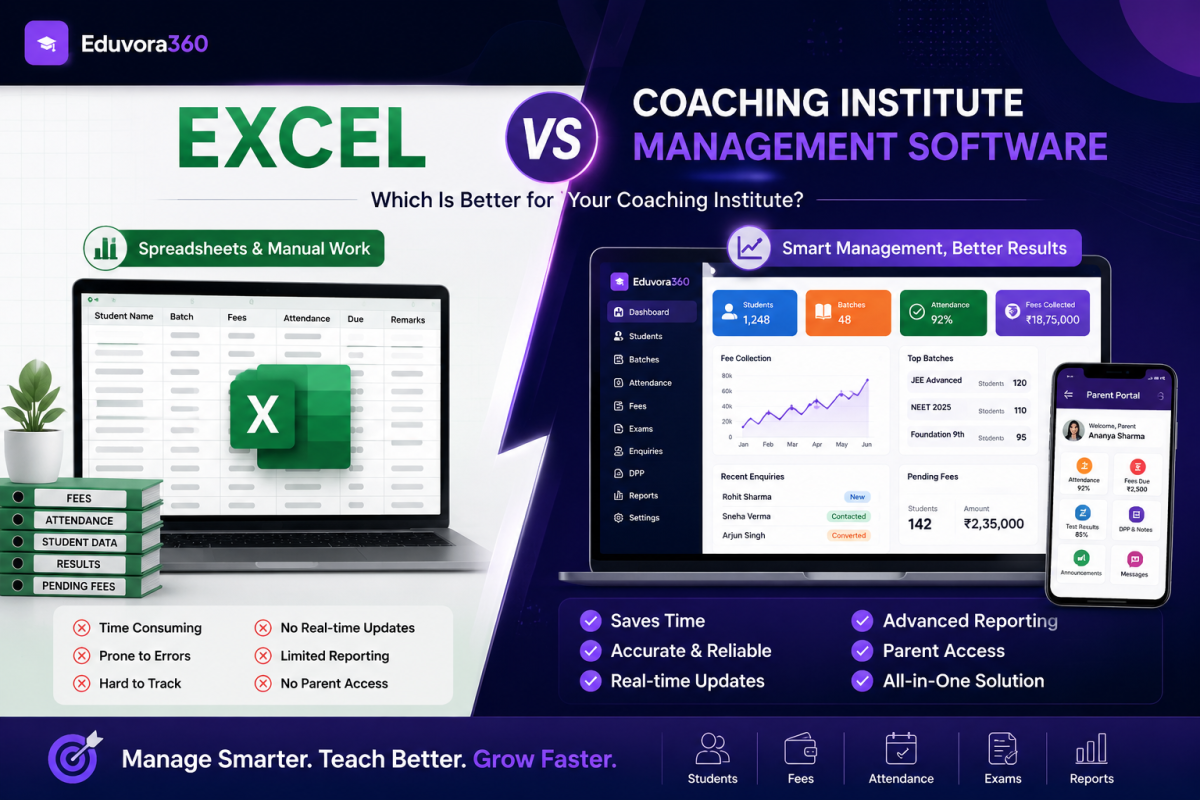
Excel vs Coaching Institute Management Software: Which Is Better for Your Institute?
Running a coaching institute involves much more than teaching students. Institute owners and administrators need to manage student records, batches, attendance, fee collection, pending payments, timetables, examinations, enquiries, assignments, staff, parent communication, and financial records.
Many coaching institutes start by managing these activities through Excel spreadsheets. Excel is familiar, flexible, and useful when an institute has a limited number of students.
However, as the institute grows, maintaining multiple spreadsheets can become time-consuming and difficult.
This creates an important question:
Excel vs Coaching Institute Management Software – which is better for running a growing coaching institute?
The answer depends on the size and requirements of your institute. In this guide, we compare Excel with dedicated Coaching Institute Management Software and explain when it may be the right time to move from spreadsheets to an integrated digital management system.
Why Do Coaching Institutes Use Excel?
Excel is often one of the first digital tools used by coaching institutes because it is simple to start with.
An institute may maintain separate Excel sheets for:
- Student details
- Admission records
- Batch allocation
- Monthly fee collection
- Pending fees
- Attendance
- Examination marks
- Staff details
- Income and expenses
- Admission enquiries
For an institute with a small number of students and limited operations, this approach can work reasonably well.
The challenge starts when the number of students, teachers, batches, transactions and enquiries increases.
You may eventually have one spreadsheet for fees, another for attendance, another for admissions and several more for different batches or academic sessions.
At this stage, information becomes scattered instead of connected.
What Is Coaching Institute Management Software?
Coaching Institute Management Software is a dedicated platform designed to manage the day-to-day operations of coaching centres and educational institutes.
Instead of maintaining information across multiple spreadsheets, registers and messaging applications, institute management software brings important activities into one connected system.
A platform such as Eduvora360 can help coaching institutes manage areas including:
- Students and profiles
- Batches
- Attendance
- Fee collection
- Pending fees and receipts
- Timetables
- Admission enquiries
- Exams and results
- DPPs and assignments
- Parent access
- Staff accounts
- Income and expenses
- Reports and analytics
The objective is not simply to replace Excel. It is to create a connected workflow where information entered in one part of the institute can be used wherever it is required.
Excel vs Coaching Institute Management Software: Quick Comparison
Feature
Excel
Coaching Management Software
Student Records
Manual sheets
Centralised profiles
Attendance
Manual entry
Digital tracking
Fee Management
Manual calculations
Automated fee tracking
Pending Fees
Check sheets manually
Central pending-fee view
Fee Receipts
Usually manual
Digital receipts
Batch Management
Separate sheets
Centralised management
Parent Access
Not available
Parent portal
Exams & Results
Manual sheets
Integrated results
Enquiries
Separate sheets
Enquiry management
Staff Access
Difficult to control
Role-based access
Reporting
Manual reports
Centralised reports
Scalability
Difficult with growth
Built for growth
1. Student Management
In Excel, student information is normally maintained row by row.
This works initially, but problems can appear when the same student's details are required in different spreadsheets for fees, attendance, examinations and batches.
Repeated data entry can also increase the possibility of outdated or inconsistent records.
With Student Management Software for Coaching Institutes, each student can have a central profile connected to relevant operational records.
This makes student information easier to organise as the institute grows.
2. Attendance Management
Attendance is one of the most frequent administrative activities in a coaching institute.
With Excel, staff may first mark attendance in a register and later transfer it to a spreadsheet. Alternatively, teachers may maintain different attendance files for different batches.
Finding the attendance history of a particular student can therefore require additional manual work.
A Coaching Institute Attendance Management Software provides a more structured approach.
Attendance can be maintained digitally and reviewed batch-wise or student-wise. This also makes it easier to identify students with irregular or low attendance.
For growing institutes, this can save considerable administrative effort.
3. Fee Collection and Pending Fees
Fee management is another area where spreadsheets can become complicated.
A typical Excel fee sheet may include:
Student Name → Total Fee → Paid Amount → Balance → Due Date → Payment Mode
This appears simple until hundreds of students have different fee structures, instalments and due dates.
Your administrative team then needs to continuously check which students have paid and which payments are overdue.
With Coaching Institute Fee Management Software, payment information can be organised centrally.
For example, Eduvora360 supports fee collection records, pending-fee tracking, receipts and WhatsApp fee-reminder links, helping institutes maintain a clearer view of their collections.
Instead of searching through rows of data at the end of the month, administrators can identify pending payments more efficiently.
4. Managing Multiple Batches
Imagine an institute with:
- 300 students
- 10 batches
- 8 teachers
- Multiple subjects
- Different class timings
Managing all of this through separate Excel sheets can quickly become complicated.
A coaching management system allows institutes to organise students into batches and connect related operational information more systematically.
As the number of batches increases, having a central system becomes increasingly valuable.
5. Admission Enquiry Management
Admission enquiries are directly connected to the growth of a coaching institute.
However, many institutes still manage leads through notebooks, WhatsApp conversations or simple Excel files.
The problem is not necessarily recording an enquiry. The bigger problem is following it up consistently.
If a prospective student enquires today and nobody follows up later, the institute may lose a potential admission.
A coaching institute management platform with an enquiry management system can help maintain prospective-student information and follow-up activity in a more organised workflow.
6. Exams, Results and Student Performance
Excel is powerful for calculations, but maintaining examination records across multiple classes and tests still requires significant manual organisation.
Teachers may have separate files for:
- Weekly tests
- Monthly examinations
- Mock tests
- Subject-wise marks
- Student rankings
Dedicated coaching software can bring examination results and student records together.
With Eduvora360, institutes can manage exams, results, marks and academic activities such as DPPs from the same broader management platform.
This can make it easier to understand a student's progress without searching through multiple files.
7. Parent Communication
This is one of the biggest differences in the Excel vs Coaching Institute Management Software comparison.
Excel is primarily an internal data-management tool. It does not naturally provide parents with a dedicated view of their child's information.
As a result, parents may repeatedly contact the institute asking:
“Was my child present today?”
“What was the test result?”
“Has the fee been received?”
“Is there any pending payment?”
A coaching management system can provide a more organised communication structure.
Eduvora360, for example, includes parent access where relevant information such as attendance, fees, results and academic updates can be made available through the platform.
This can reduce repetitive administrative queries while improving transparency.
8. Staff Access and Data Control
Sharing Excel files between multiple employees can create another challenge.
If several people have access to the same spreadsheet, controlling who can view or modify particular information may become difficult.
A dedicated Coaching Institute ERP Software can provide separate staff accounts and permissions.
An institute owner may need complete access, while a teacher may only require access to specific batches or academic functions.
This creates a more structured approach to institute data.
9. Financial Management
Excel is commonly used for basic income and expense tracking.
However, when student fee collections, expenses, salaries and financial reporting are maintained in different files, getting a clear picture of institute finances can require additional reconciliation.
Eduvora360's broader management platform includes finance capabilities such as income and expense management, P&L, GST summaries and staff salary records depending on the selected plan.
This allows operational and financial information to remain more closely connected.
10. Scalability: What Happens When Your Institute Grows?
This is perhaps the most important factor.
Excel may work perfectly well for a small institute.
But ask yourself:
Will the same system remain easy to manage when you have 200, 500 or 1,000 students?
As your institute grows, you may need more:
- Staff accounts
- Batches
- Attendance records
- Fee transactions
- Enquiries
- Examinations
- Parent communication
- Reports
- Financial records
Adding more students should not require creating more disconnected spreadsheets and increasing administrative work.
A good Coaching Institute Management System is designed to grow alongside your institute.
When Is Excel Still a Good Option?
Excel is not a bad tool.
In fact, it can still be useful when:
- Your institute is very small
- You have limited student data
- One person manages most administration
- You only require basic record keeping
- Your operations do not require parent or staff portals
However, when your team spends increasing amounts of time updating sheets, finding information, checking pending payments and preparing reports, it may indicate that your institute has outgrown a spreadsheet-based workflow.
When Should You Switch to Coaching Institute Management Software?
Consider moving from Excel to a dedicated system when:
- Your student count is increasing.
- You manage multiple batches and teachers.
- Pending fees are becoming difficult to track.
- Attendance is spread across registers and sheets.
- Admission enquiries are being missed.
- Parents frequently contact staff for routine updates.
- Multiple employees need controlled access.
- Reports take too much time to prepare.
- Student performance data is scattered.
- You want to manage the institute from one central platform.
The goal is not simply digitisation.
The goal is to reduce repetitive administrative work and build a management process that can scale with your institute.
Why Eduvora360 for Coaching Institutes?
Eduvora360 Coaching Institute Management Software is built specifically for coaching institutes in India.
Instead of using separate systems for students, attendance, fees, enquiries and academic management, Eduvora360 brings important institute operations together.
Depending on the plan and requirements, institutes can manage students, batches, attendance, fees, pending payments, timetables, examinations, results, DPPs, enquiries, parent access, staff permissions, finance and reporting through the platform.
This makes it suitable for institutes that want to move beyond disconnected spreadsheets and establish a more organised digital workflow.
Frequently Asked Questions
Is Excel enough for managing a coaching institute?
Excel can be sufficient for smaller institutes with simple administrative requirements. As student numbers, batches, transactions and staff increase, dedicated coaching management software can provide a more scalable approach.
What is the best alternative to Excel for coaching institutes?
A dedicated Coaching Institute Management Software is a strong alternative because it can combine student management, attendance, fees, batches, examinations, enquiries and reporting within one system.
Can coaching management software manage pending fees?
Yes. Fee management systems can maintain payment and outstanding-fee records, making it easier for administrators to identify pending payments and perform follow-ups.
Can I move existing Excel data to Eduvora360?
Yes. Eduvora360 states that existing student, batch and fee-history data can be imported during onboarding, including information currently maintained in Excel.
Is coaching management software useful for 100+ students?
Yes. Once an institute has 100 or more students, managing multiple batches, attendance records, fee payments, enquiries and examinations manually can become increasingly difficult. A centralized management system can simplify these operations.
Final Thoughts: Excel or Coaching Institute Management Software?
The Excel vs Coaching Institute Management Software decision ultimately depends on how complex your institute has become.
Excel is flexible, familiar and useful for basic record keeping. But as a coaching institute grows, relying on separate spreadsheets for attendance, fees, students, enquiries and results can create unnecessary administrative work.
A dedicated Coaching Institute Management Software brings these activities into one connected system.
For institutes planning to grow, improve fee tracking, digitise attendance, strengthen parent communication and reduce manual administration, moving to a platform such as Eduvora360 can be the next logical step.
Stop managing your growing coaching institute across multiple spreadsheets. Bring students, fees, attendance, batches, enquiries, results and finance together with Eduvora360.
Stop running this on a register and an Excel sheet
Eduvora360 gives the owner, every teacher and every parent their own login — students, fees, attendance, results and a full finance portal, all sharing one dataset.